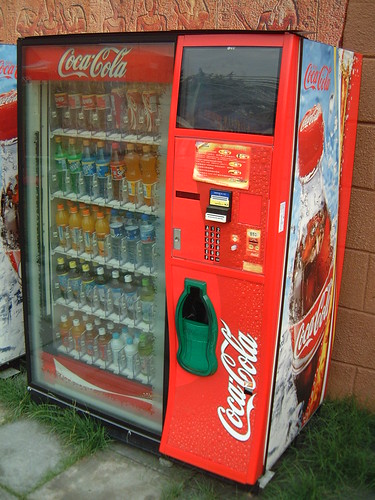
This isn't exactly hacking, but it's still a fun party trick. We had a coke machine installed at work about 3 months ago, I did this in front of some people at lunch and retrieved a free coke (the machine was there 4 days and was still awaiting it's setup closure, so it was still wide open and unrestricted).
Anyways:
hacking a coke machine.
It's very simple. Each machine obviously has a firmware controller installed on it. It has a basic debug menu in it so that a machine technician can get some info about the machine, and even control some of it's functions. On most machines, this debug is left open - at least enough to get in and play around. On some machines it's left WIDE open - free pop, seriously. Others, you can't access it at all.
How to do it?
It's cake! You have to hit the dispense buttons in this order:
(4) (2) (3) (1)
If the buttons are vertical, 1 is the top button, 2 is just below it, and so on. If they're horizontal, the button on the left is 1, next is 2, etc. If it's two horizontal rows, it's basically the same thing. On the second row, the first button will be number 5-7, depending on the config.
Basically, vertical - up to down; horizontal - left to right, top row only.
Once you access the debug menu - you'll know because the LCD will display something different, often the word "Err" or "ErOr", you can begin navigating the menu.
#1 - Exit/back
#2 - Up
#3 - Down
#4 - Select/enter
Just hit up and down to surf through the options. Different things will display on the screen. I've done this to quite a few machines that are from 1998-2004 or so, but I've only done it once to a brand new machine - so hopefully it'll work on the machines near you the same way it did for me.
Here are some of the menu possibilities:
CASH - see how much cash the machine has in it. This opens a submenu, and you'll go through 8-20 options, one for each slot number. You can see how much money each type of pop has made.
SALE - this is how many pops the machine has sold total. On some machines this is the lifetime total, on other machines it is since the stock guy last reset it.
VER - firmware version on the machine, unimpressive
EROR - shows any errors the machine has encountered, this opens a submenu as well. I don't remember all the abbreviations, but I know it shows stuff like rows getting jammed physically (pop getting stuck), or the machine itself having a problem, bill checking errors, change verifying errors, etc.
RTN - takes you out of debug mode, on most machines it does this automatically after 60 seconds, but on some really old ones you have to select this or people can't get pop - lmao.
CPO (generally disabled) - coin payout mode - this will literally drop whatever kind of coins to the coin return that you want it to
COn (generally disabled) - this one can spit out pops for you, it works similar to the CASH one above, goes into a submenu and you select an option, the options control different parameters of the machine, everything from the cost of pops to how long a quarter will "stay in memory" after you put it in there - you could set this to 2 seconds and it would eat people's money (you have to wonder if someone did this before you sometimes), there's lots of other options
If nothing else, it's a funny trick to access the menu and see basic stuff like how much cash it has in it, and is interesting to do in front of a friend for the reaction.
BTW, my first thread - new to the boards, but hopefully my material isn't noobish idiocy.


 Login
Login FAQ
FAQ Search













 143
143